


Choose who shows first in every member, post and album search.
Stack sorts like most reviews, highest rating, recently active or fair daily rotation, and give each membership plan, category or place its own order.
Built for owners of Brilliant Directories sites who want the right members at the top of their search results.
Read top to bottom. Each rule decides ties left by the one above.
Your search results, in your order.
Set the rules in the panel you already use, and every search results page follows them.
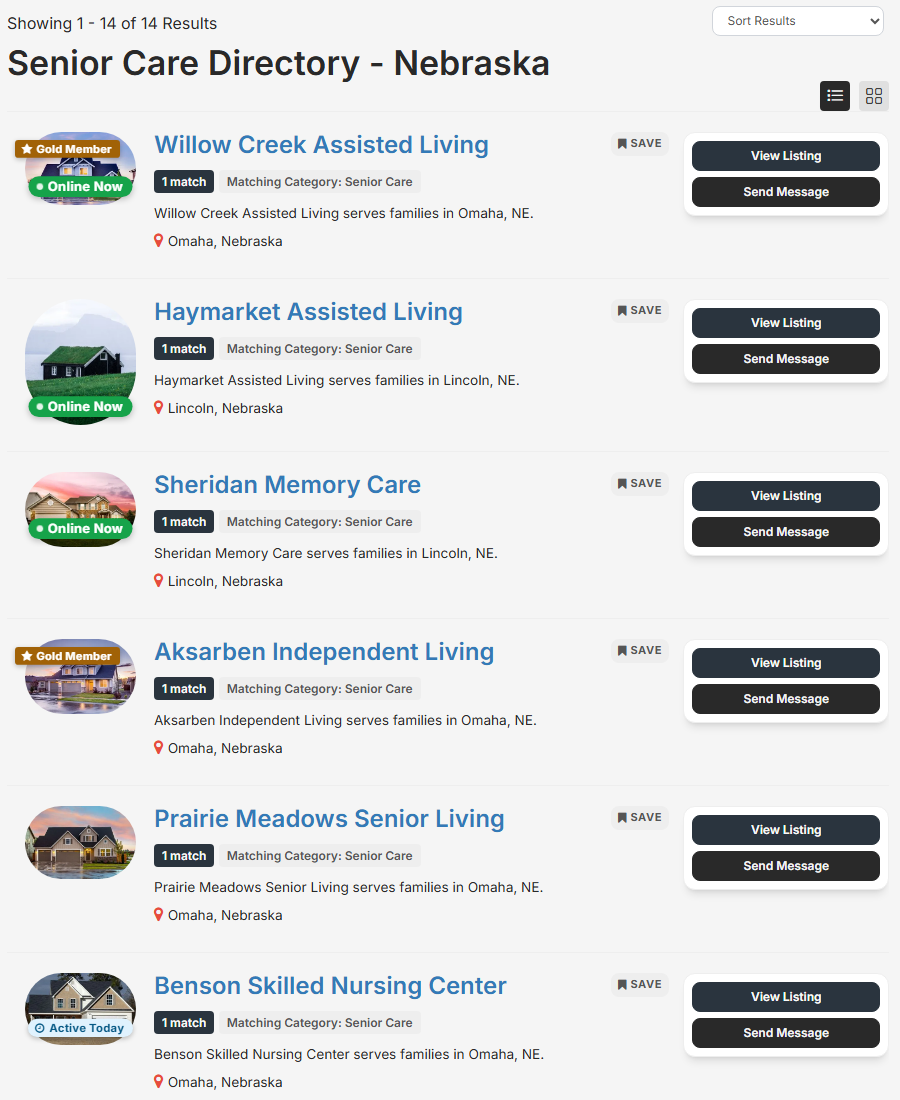
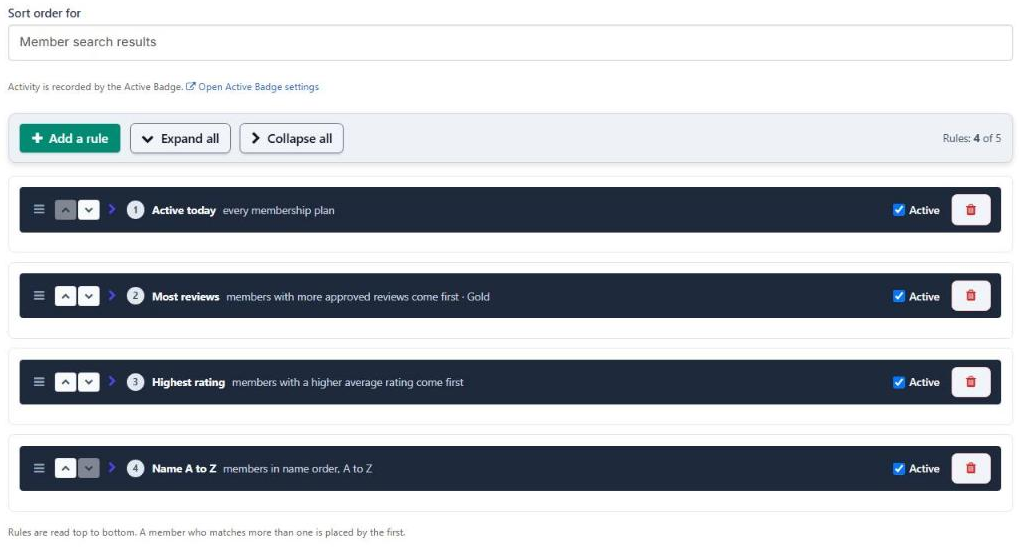
The right members at the top.
Brilliant Directories gives you one sort for the whole site. DirectorySort lets you stack rules and set the order the way you sell.
Up to five sorts, in order
Stack them top to bottom. When two members tie on the first, the next one decides.
Reward the best members
Most reviews, highest rating, verified members, members with a photo and the most complete profiles first.
Fresh faces near the top
Recently active members first, or a fair daily rotation that gives every member a turn.
Each plan its own order
With Sort Pro, sort your top plan by reviews and another plan alphabetically, on the same page.
Right for the page
With Sort Pro, run a rule only on chosen categories, states, cities, or keyword and place searches.
Posts and albums too
Give each post type its own list: title, publish date, price, plan order, and start and end dates for events.
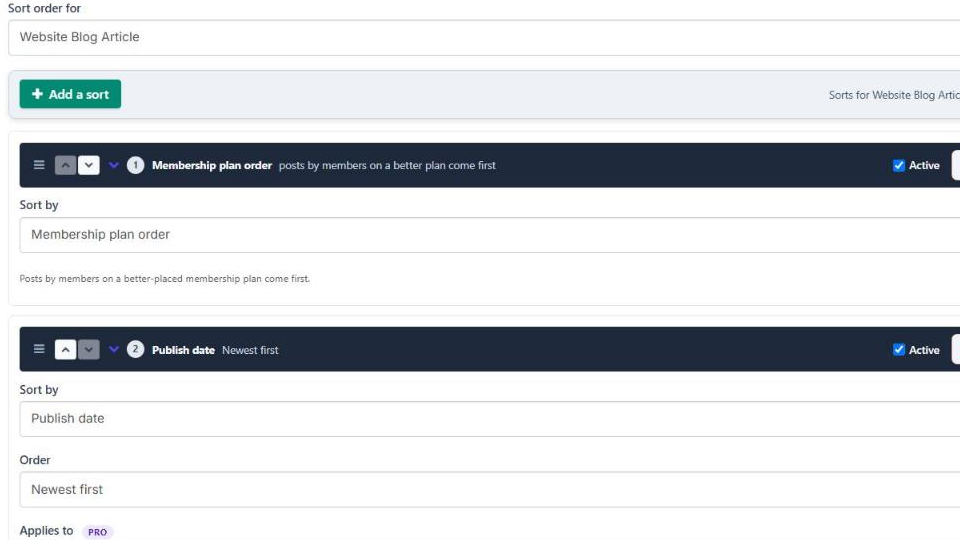
Every post type gets its own list.
Pick a post type under Sort order for and give it its own sorts. Your blog can show newest first by plan while your events show the soonest start date, and a post type with no list keeps the order it has today.
Order that reaches sponsors, filters, activity and hours.
On a site that runs our other plugins, Sort works with them.


Order for filtered results
Visitors narrow your member search with filter panels, and your rules decide the order of whatever is left.


Recently active first
Active Badge records when each member was last on the site, so Sort can put the members active today first.


Sponsors first
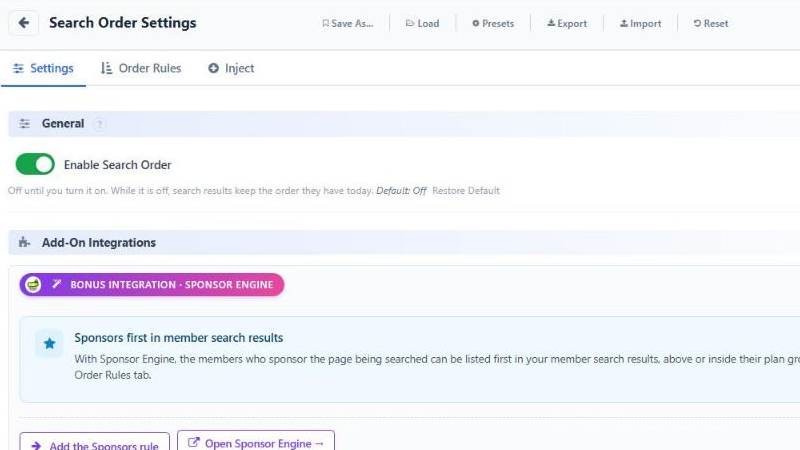
With Sponsor Engine, the members who sponsor the page being searched can be listed first, above or inside their plan group.


Open now first
With Directory Hours, members open right now come first, then the rest by when they next open, holidays and closures included.
Brilliant Directories gives you one sort for the whole site.
Brilliant Directories orders member results with one setting for the whole site, such as member name, number of reviews or random, plus one priority number per membership plan. Ordering each plan differently, or one city differently, has meant editing the search code by hand, and a platform update can undo that edit.
DirectorySort keeps the order in settings. Each setup below is built from its own settings, with the steps to build it.
VIP by reviews, Premium A to Z
Your VIP members are listed by number of reviews and your Premium members alphabetically, on the same results page, while plan order still keeps VIP above Premium.
Build it
- On the Order Rules tab, add a Most reviews rule and set Applies to: Only members on the plans ticked below.
- Pick your VIP plan in the plan list.
- Add a Name A to Z rule and pick your Premium plan. Both use Sort Pro.
Active members first
Members who were on the site today come first, so a visitor reaches someone likely to answer. Members who hide their online status are never moved.
Build it
- Install Active Badge, which records when each member was last on the site.
- Add a Recently on the site rule and choose how recent, such as Active today.
Everyone gets a turn
Every member gets a turn near the top. The order changes once a day, so a visitor paging through results sees each member once.
Build it
- Add a Fair daily rotation rule.
- Put it below any rule that should always win, such as sponsors or your top plan.
Your picks on top
The members you choose come first, in the order you set, such as a featured partner or a new member you want seen.
Build it
- Add a Hand-picked members first rule.
- Search for members by name, email or member number and put them in order. This uses Sort Pro.
One city, its own order
In one city or category your best-reviewed members lead, while everywhere else keeps your site-wide order.
Build it
- Add the rule, then open Only on these categories and places.
- Pick the categories, sub-categories, states or cities. Ticks in two lists must both match. This uses Sort Pro.
Set it up in the panel you already use.
Everything lives in DirectoryCustomize under My Widgets, in the Search Order settings.
Run down your checklist.
The things buyers compare when they choose how their search results are ordered. DirectorySort does all of these, and the targeting comes with Sort Pro.
-
Up to five sorts, in orderThey run top to bottom. When members tie on one, the next decides.
-
Reviews and ratingMost reviews or highest rating first, counting approved reviews only.
-
Recently active membersMembers who were on the site in the last minutes, hours or day come first, with Active Badge.
-
Fair daily rotationEvery member gets a turn near the top. The order changes once a day.
-
Any profile fieldMembers with a value you pick come first, or a number field from highest or lowest. Sort Pro.
-
Hand-picked members firstSearch for members by name, email or member number and set their order. Sort Pro.
-
A different order per planEach rule can apply to every plan or only the plans you tick. Sort Pro.
-
Categories, places and searchesRun a rule only on chosen categories, states, cities, or keyword and place searches. Sort Pro.
-
Posts and albums tooEach post type gets its own list: title, publish date, price, plan order, and event dates.
-
Sponsors firstWith Sponsor Engine, the members sponsoring the page being searched can lead the list.
-
Turn it off any timeTurn it off and results go back to their usual order. Your rules stay saved.
An order you set and keep.
Built for owners who want the right members at the top without paying for custom code each time.
Settings, not edited code
The usual way to change the order is to edit the member search query by hand, and the next platform update can undo it. Sort keeps your order in settings.
Stack rules, per plan and place
Brilliant Directories gives you one sort for the whole site. Sort stacks up to five, and Sort Pro sets them per plan and per place.
Every sort in one plugin
Reviews, rating, activity, rotation, hand-picked members, profile fields and post lists, in one place.
Every new version, on every plan
Updates arrive on their own through DirectoryCustomize. Nothing to reinstall.
Kept working as BD changes
When Brilliant Directories updates its code, we update the plugin to match.
Change it any time yourself
Add, reorder or turn off a rule from the settings panel whenever you like. No new order, quote or developer.
Works with your other plugins
With Sponsor Engine a page's sponsors can lead, and with Filter Engine your rules order the filtered results.
Sort or Sort Pro, paid your way.
Each comes monthly, yearly or as a one-time fee, with every new version.
Stacked sorts for members and each post type
Sort
$320
One-time · or $10/mo · $100/yr
- Every sort, stacked up to five deep
- Member, post and album results
- Every new version
Everything in Sort, plus targeting
Sort Pro
$640
One-time · or $20/mo · $200/yr
- A different order for each plan
- Rules for chosen categories, places and searches
- Hand-picked members and profile field sorts
Sort or Sort Pro?
Technical issues with the plugin are covered on every plan. Other help and changes are billed at our normal rates.
One price covers your whole directory's order.
- Every sort, for member, post and album results.
- Up to five stacked sorts per list, and you can turn it off any time.
- With Sort Pro, rules per plan, category, place and search.
- Every new version, kept working as Brilliant Directories changes.
The short answers.
Will this change my search results right away?
What happens to members who match none of my rules?
Does membership plan order still apply?
Can I undo it?
What about searches by distance?
What is the difference between Sort and Sort Pro?
I already used Search Order. Do I keep my rules?
Put the right members at the top.
Questions about setting it up? The help pages walk through every setting, or send us a message.